 Tiertac
How to play Tiertac
Tiertac is tic-tac-toe played on boards stacked on top of each other. Players take turns placing a piece on any empty square of any board. The first player to complete a straight line of the chosen length wins, whether the line lies flat on one board or runs down through the stack.
The three boards
A Tiertac board is a cube made of square boards stacked on top of each other: three boards of 3×3, four boards of 4×4, or five boards of 5×5. The bigger the cube, the more players can join and the more choice you have over how long a line must be.
| Board | Squares | Players | In a row to win | Winning lines |
|---|---|---|---|---|
| 3×3×3 | 27 | 2 | 3 | 49 |
| 4×4×4 | 64 | 2 or 3 | 3 or 4 | 224 with 3 in a row, 76 with 4 |
| 5×5×5 | 125 | 2, 3 or 4 | 3, 4 or 5 | 603 with 3 in a row, 302 with 4, 109 with 5 |
The player counts include computer players. The 3×3×3 cube is for two, so a solo game on it is you against one computer opponent.
Each player plays as X, O, a triangle or a square, in a color of their choice. In a two-player game the pieces are X and O.
What counts as a line
A winning line is the chosen number of your own pieces in an unbroken straight line. It can run in any of 13 directions: 4 that stay on one board, and 9 that pass down through the stack, one square on each board.
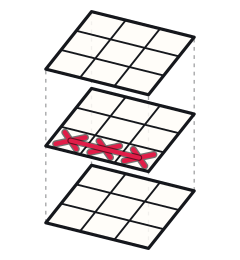
On one board
Across, up and down, or diagonally on a single board, just like ordinary tic-tac-toe. Every board counts, not only the top one.
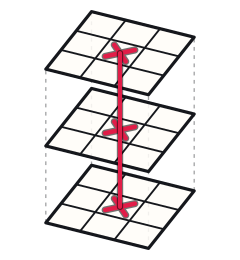
Straight down
The same square on every board, one above the other.
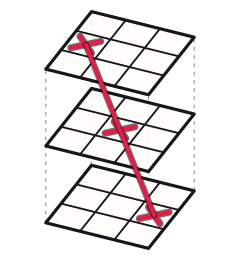
Sloping down through the stack
One step along a row or column on each board as the line goes down, like a staircase.
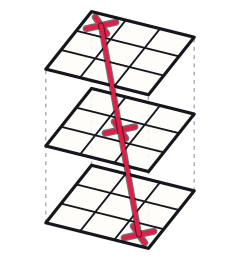
Corner to corner
One step along a row and a column at the same time on each board. The longest of these run from a corner of the top board, through the very center of the cube, to the opposite corner of the bottom board.
When the line you need is shorter than the board is wide, for example 3 in a row on a 4×4×4 or 5×5×5 cube, any 3 squares next to each other in a straight line count, wherever they are along the longer line.
If every square is filled and nobody has a line, the game is a draw. On the 3×3×3 cube that cannot happen: however the 27 squares are filled, one of the two players always has a line.
Setting up a game
- Choose how to play. The home screen offers Solo vs AI, Same device, Host a game and Join with a code.
- Choose the board (3×3×3, 4×4×4 or 5×5×5), the number of players, and how many in a row are needed to win. Options a board does not allow are greyed out.
- Name each player and pick their piece and color. Every player needs a different name and a different color, so the pieces are easy to tell apart.
- Start the game. When you join with a code, the host has already chosen the board and the rules.
Placing a piece: mouse, touch and keyboard
Playing a move takes two steps: choose a square, then confirm it. This stops a slip of the finger from costing you the game.
- Choose a square: left-click it with a mouse, or tap it on a touch screen. Your piece appears there straight away, and the cube turns 20 degrees so you can check the square from another angle.
- Confirm: press the flashing Confirm button to the right of the cube, or press Enter.
- Change your mind: choose a different square to move the piece there, or press Esc to cancel.
After you confirm, the view takes two seconds to turn back to where it was. The board does not respond until it has, so wait for it to settle before the next move.
Turning and zooming the cube
| To | With a mouse | On a touch screen |
|---|---|---|
| Choose a square | Left-click | Tap |
| Play the move | Confirm button or Enter | Confirm button |
| Turn the cube | Right-click and drag | Tap and hold, then drag |
| Zoom | Scroll wheel | Pinch |
| Back to the normal view | Reset view button, which appears at the top right of the board once you have zoomed or moved it | |
Turning the cube is the best way to spot lines that run down through the stack. You can also turn your phone or tablet at any time, even in the middle of a game: the game lays itself out again for portrait or landscape.
Undo, hints and who goes first
Undo
For 5 seconds after a move, the player who made it can take it back with the Undo button. Undo is not possible once the next player has replied, or if the move won the game.
Hints
A player who has lost two games in a row gets one hint per game. The suggested square flashes, fading over 3 seconds each time, until that player moves.
Who goes first
Player 1 opens the first game. After that, the player who lost opens the next one. With three or four players, the next game is opened by the player on the longest losing run; if two are level, it goes to whoever comes next in turn order after the winner.
The win-probability bar
After every move, the bar above the board shows each player's chance of winning. Tiertac works it out by playing 10 quick simulated games from the current position, with each simulated player behaving the way the real player has played this session, and blending that with the share of games each player has won so far.
Picking up again
A same-device game is remembered for six hours on that device, so it survives a reload. For an online game, the code is remembered so one tap takes you back to it.
Playing against the computer
Choose Solo vs AI to play against 1 to 3 computer opponents, each set to Easy, Medium or Hard, on any board. In same-device and hosted games, any seat other than Player 1 can also be given to a computer player at one of those three levels. Solo and same-device games need no connection once Tiertac is open. The computer players run on your own device; no data is sent to an AI service.
Playing with friends online
One player chooses Host a game, picks the board and rules, and gets a 4-character game code. Everyone else chooses Join with a code and types it in. The host can share the code by copying it, by text or email, or with the phone's share sheet; opening a shared link fills the code in for you. A code works for one hour. The FAQ explains game codes in more detail, and the support page covers codes that will not work.